Views: 94 Author: Site Editor Publish Time: 2026-02-03 Origin: Site
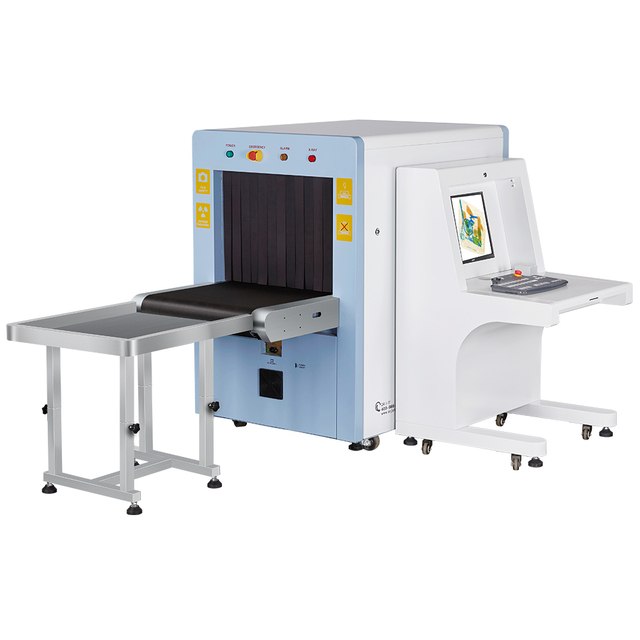
When using an x ray baggage scanner, you should follow simple steps to ensure safety. Safety is crucial during the setup of the x ray baggage scanner. Skilled technicians assist in placing the x ray baggage scanner in the correct location. By operating the x ray baggage scanner properly, you help protect everyone. The x ray baggage scanner inspects baggage using its advanced x-ray system. Following the security screening machine guidelines is essential for your safety. Always make sure the x ray baggage scanner is used according to safety regulations.
Always inspect the x ray baggage scanner before each use.
Store the x ray baggage scanner in a clean, dry area.
Always check the x-ray baggage scanner before you use it. This helps keep everyone safe and makes sure it works right. Pick a place that is clean, dry, and has good temperature control for installation. This keeps the scanner parts safe. Only trained technicians should set up and take care of the scanner. This makes sure all safety rules are followed. Calibrate the scanner every six months. This helps it find threats correctly and work well. Keep good records of all maintenance. Write down every inspection and repair. This helps you follow safety rules.
Pick a good spot for your x-ray baggage scanner. The place should be dry and have fresh air. It must not have dust. Do not put the scanner where it gets hot or wet. Keep it away from sunlight. These things help protect the scanner’s parts.
The scanner works well from 41°F to 104°F. Humidity should be between 0% and 90% (non-condensing).
You can keep the scanner safe from -4°F to 140°F.
Too much heat or humidity can hurt the x-ray tube and detector panels.
High heat can make cooling systems break faster.
Humidity and dust can block parts and make the scanner work poorly.
Tip: Use rooms with climate control for the scanner. This helps the scanner last longer and work better.
Only trained technicians should install and fix the scanner. Make sure they finished the right training courses. Training helps them set up the x-ray system safely and correctly.
Training Course | Duration | Requirement |
|---|---|---|
X-ray Operator Radiation Safety Training | 2 hours | Required |
X-ray Operator Training Course | 1.5 hours | Required |
Radiation Safety Officer Training Course | 2 hours | Required |
State Specific Regulatory Turnkey Radiation Protection Program | N/A | Required |
Note: Trained technicians follow safety rules. They keep everyone safe during installation.
Check the outside of the scanner box before installing it. Look for dents, tears, or water marks. If the box is damaged, the scanner might be broken inside. Tell someone if you see problems before opening the box.
Look at all sides of the box.
Check for broken seals or missing labels.
Make sure the scanner stands upright and does not tip over.
Alert: Do not install a scanner with damaged packaging. You could break the machine and lose the warranty.
Open the box slowly and carefully. Use tools that will not scratch the x-ray baggage scanner. Check every part and accessory to make sure nothing is missing. Put the scanner on a flat floor that does not shake. Make sure the floor is clean and has no dust. Leave space around the scanner so air can move easily. This keeps the scanner cool and helps it work well.
Tip: Get someone to help you move the scanner. It is heavy and hard to lift by yourself.
Connect the main parts of the x-ray system by following the manual. Attach the conveyor belt and the control panel. Tighten all bolts and screws so nothing is loose. When you set up the electrical system, follow these safety rules:
Follow the newest international safety standards.
Make sure radiation stays under 1 μSv/hr at 10 cm from any side.
Use outlets that are grounded and check the voltage.
Do not turn on the scanner if wires look broken.
Check all cables and plugs before you turn on the machine. If you see anything wrong, stop and call a technician.
Calibrate the x-ray system before you use it. Calibration helps the scanner find threats and stops false alarms. Even good scanners need calibration often to stay reliable. Dust, changes in temperature, and bumps can change how the x-ray works.
Calibrate for density, color, and penetration levels.
Follow the manufacturer's rules for calibration.
Test the scanner with sample bags to make sure images are clear.
Note: Calibrate your x-ray system often to keep it safe and accurate. Regular maintenance helps you follow safety rules and keeps the scanner working well.
You need to wear the right gear when installing x-ray scanners. Gloves keep your hands safe from sharp edges. Safety glasses protect your eyes from dust and small pieces. Closed-toe shoes stop your feet from getting hurt if something falls. Wear a lab coat or coveralls to keep dangerous materials off your clothes. Using personal protective equipment helps stop injuries and keeps everyone safe in the work area.
Tip: Check your gear before you start working. If something is broken, replace it right away.
X-ray machines make radiation. You must follow rules to stay safe. Never stand where the x-ray beam goes. Put up warning signs so people know about the radiation. Turn off the scanner when you are not testing or setting it up. Only trained people should use the x-ray system. You need to check radiation levels with special tools. These steps keep you safe from radiation and help stop accidents.
Put lead barriers around the scanner if you can.
Try not to spend too much time near the x-ray machine.
Stay back from the scanner when it is on.
Alert: If you think there is a radiation leak, stop using the scanner and call a trained technician.
The law says you must follow rules when you install x-ray scanners. You have to register your scanner with the State Radiation Control Agency. Put up the notice for employees where everyone can see it. Pick a trained Radiation Safety Officer to watch over safety. Write down your radiation protection plan and check it every year. Operators need safety training when they start and every year after. Test safety devices and check for leaks once a year. Tell the State about any changes to your scanner within 30 days. If you are in Canada, check your province for extra rules.
Compliance Check | Description |
|---|---|
Registration | You must register your scanner with the State Radiation Control Agency. |
Notice to Employees | Put the State notice where people can see it. |
Radiation Safety Officer | A trained person must be in charge of safety. |
Radiation Protection Program | Write a plan and check it every year. |
Radiation Safety Training | Operators need training at first and every year. |
Equipment Testing | Test safety devices and check for leaks every year. |
Notification of Changes | Tell the State about changes to your scanner in 30 days. |
Provincial Requirements | In Canada, check your province for special rules. |
Doing these checks helps you follow the rules and keeps everyone safe from dangerous items.
First, check that all safety signs are easy to see. Warning signs should be on every side of the scanner. Put in the operator key to turn on the system. The scanner will not start without the key. You must stay by the scanner while it works. The scanner uses AI to watch if you are there. If you leave, the scanner will turn off. If the scanner finds a threat, the conveyor belt stops. You can then check the baggage for banned items. Emergency stop buttons are close and simple to use. Press the emergency button if you need to stop the x-ray fast. Always follow the rules to keep everyone safe.
Procedure Description | Details |
|---|---|
Safety Signage | Radiation warning signs on all sides. |
Automatic Shutdown | X-ray turns off if panels open. |
Emergency Shutdown | Button stops radiation right away. |
Key-Controlled Operation | Needs operator key to work. |
Operator Presence Verification | AI checks if you are there. |
Intelligent Threat Detection | Conveyor stops for threats. |
Regulatory Compliance | Follows safety rules. |
Pre-Deployment Testing | Checked before use. |
You need training to use x-ray screening well. Online courses let you learn when you want. These classes teach you how to use and care for the scanner. You also learn how to spot threats. You practice finding banned items and reading x-ray pictures. VITA ACADEMY gives lessons online and in person. You must get certified for your job, like baggage or cargo. Training covers security systems, x-ray basics, and how to find threats.
Learn about security inspection systems
How x-ray machines work and what they do
How to read x-ray images and find threats
How to check bags for banned items
Learn about Weapons of Mass Destruction and IEDs
Certify workers for x-ray screening.
Make sure staff know how to use the scanner.
Teach staff about new security threats.
Give practice to help staff find threats.
You must keep records for every time you use the scanner. You need a radiation safety permit and an environmental impact report. The environmental department does the report. These papers show you follow the rules and help with checks. Keeping logs of use and training helps you follow the law and get better at x-ray screening.
Documentation Required | Description |
|---|---|
Radiation Safety Permit | Needed to use the x-ray. |
Environmental Impact Assessment | Done by the environmental department. |
Tip: Keep all your papers neat and up to date. This helps you show you follow the rules and keeps things safe.
Keep your x ray baggage scanner in a dry place with fresh air. Make sure there is no dust around it. This helps the parts last longer and work well. Each day, look at the scanner before you use it. Check the conveyor belt for any damage. See if any screws or bolts are loose. Make sure the sensors are in the right spot. Wipe the outside of the scanner with a soft cloth. Clean up dust and dirt near the scanner. Look at the air filters to make sure they are not blocked. This stops the scanner from getting too hot.
Maintenance Task | Description |
|---|---|
Daily visual checks | Inspect conveyor belt wear, loose fasteners, and sensor alignment. |
Surface cleaning | Wipe down scanner surfaces to remove dust and debris. |
Air filter check | Make sure filters are clear and working. |
Tip: Clean the scanner at the start and end of each shift. This helps the scanner work well and keeps it safe for x-ray screening.
Every week and month, do a closer check of the scanner. Look at the radiation shielding curtains for any damage. These curtains can stop working well if they get worn out. Some curtains have lead inside, which can get on bags and be unsafe. Check for any damage or dirt on the curtains. Look at the imaging system and clean the filters once a month. Update the software when there are new updates. Every three months, check spare parts to see if they are still good.
Task | Frequency | Notes |
|---|---|---|
Filter Cleaning | Monthly | Keeps the scanner’s imaging system clear and free from dust or debris. |
Software Updates | As released | Installs the latest features and security patches to enhance performance. |
Spare Part Inspection | Quarterly | Checks for wear and tear, ensuring that critical components are in good condition. |
Calibration | Every 6 months | Ensures accurate image capture and reliable threat detection. |
Radiation shielding curtains can get old and not work as well.
Some curtains have lead, which can get on bags and be dangerous.
Taking care of lead parts and throwing them away can be risky for airport workers.
Alert: If you see damage or dirt, tell someone right away. Change old curtains to keep the scanner safe.
Use a checklist every time you check the scanner. This helps you find problems early and keeps the scanner ready to find threats. Write down what you find in a log. Look at the conveyor belt, screws, sensors, and curtains. Check the imaging system and filters. Watch for damage or dirt. Make sure the software is the newest version. Test the calibration and look at spare parts.
Inspection Checklist:
Look at the conveyor belt for damage.
Check all screws to see if they are tight.
Make sure sensors are lined up.
Look at the radiation shielding curtains for damage or dirt.
Clean the filters and imaging system.
Update the software if needed.
Test calibration for clear pictures.
Check spare parts for damage.
Write down all results in a log.
Note: Checking and fixing the scanner often helps you find problems before they get worse. This keeps your x-ray baggage scanner safe, working well, and ready to find threats.
You may see error messages on the x-ray display panel. These messages help you find problems fast. Some common errors include “System Overheat,” “Sensor Fault,” or “Radiation Leak Detected.” When you see an error, check the scanner manual for the meaning. You can restart the system to clear simple errors. If the error stays, look at the cables and connections. Make sure all plugs are tight. If you see a “Radiation Leak Detected” message, stop using the scanner and call a technician. Always write down the error in your log.
Tip: Keep a list of common error messages near the scanner. This helps you fix problems quickly.
Sometimes, the x-ray images look blurry or unclear. This makes it hard to spot threats or prohibited items. You can fix blurry images by adjusting the x-ray beam width. A narrower beam stops scattering and gives you clearer pictures. Clean the imaging system and filters often. Dust and dirt can block the x-ray and make images look bad. Check the calibration settings. If the images still look wrong, update the software. You can use the table below to help you solve image problems:
Problem | Solution |
|---|---|
Blurry images | Adjust x-ray beam width |
Dirty images | Clean imaging system and filters |
Wrong colors | Check calibration settings |
Old software | Update software |
Note: Clear images help you find threats and improve detection.
You can solve many scanner problems with simple steps. Restart the scanner to clear minor faults. Check all cables and plugs. Clean the conveyor belt and sensors. Make sure the air filters are not blocked. Test the emergency stop button. If you cannot fix the problem, call a trained technician.
Restart the scanner
Check cables and plugs
Clean conveyor belt and sensors
Test emergency stop button
Alert: If you see a serious error or radiation warning, stop using the scanner and get help right away.
It is important to know when you need expert help with your x-ray system. Some problems are too dangerous for you to fix alone. Watch out for these big warning signs:
If the curtain on the conveyor belt is damaged, x-rays can leak out. This can be bad for your health.
If you see water or other liquid inside the machine, it can cause a short-circuit or make the scanner stop working.
If you notice these problems, stop using the machine right away. Call a trained technician to keep your security area safe.
Alert: Do not try to fix x-ray leaks or water damage by yourself. These problems can be very dangerous and might let threats go unnoticed.
Most companies give you a 24-month warranty for your x-ray baggage scanner. This warranty pays for repairs if parts break from normal use. You should read your warranty papers to see what is covered. If something goes wrong during the warranty time, call the support team for help. They can send real spare parts and fix your scanner quickly. Keeping your warranty active helps your security system work well.
Tip: Keep your warranty papers in a safe place. You will need them if you ask for repairs or support.
If you need help with your x-ray equipment, contact a professional technician. Tell them what is wrong and give details about your machine. You can use the contact information below for different services:
Service Type | Contact Details |
|---|---|
Baggage X-Ray Scanner Repair | +91 9818521303, +91 9818821303 |
Annual Maintenance | +91 83695 72050 |
Technical Support | +91 83695 72050 |
Metal Detector Repair | +91 83695 72050 |
You can ask for yearly maintenance, fast repair service, or real spare parts for your x-ray baggage scanner. Fast help keeps your security checks working and protects against threats.
Note: Always tell the technician your machine’s model and explain the problem clearly. This helps them fix your x-ray system faster.
You must keep records for every x-ray machine you use. Write down when you check, clean, or fix the scanner. Record the date, what you did, and who did it. Good logs help you find problems early. They also show you follow safety rules. If you change a part or fix something, add it to your log right away. Keep these records in a safe place. Good logs make your security checks better and keep baggage safe from harm.
Tip: Use a notebook or a computer file for your logs. This helps you find information fast during inspections.
You have to follow strict rules when using x-ray baggage scanners. These rules keep people safe from radiation and protect your security area. The Nuclear Safety Radiation Protection Act gives the main rules for x-ray machines. You need to register and get a license for your scanner from the Nuclear Regulatory Authority (NRA). The license is good for two years. If your scanner makes very little radiation, you can ask for an exemption certificate. Make sure your supplier and your scanner both have licenses. Test your x-ray machine often to meet safety rules.
Regulation | Description |
|---|---|
Nuclear Safety Radiation Protection Act | Makes the NRA in charge of licensing and checking x-ray machines. |
Licensing Requirement | Register and license your x-ray scanner with the NRA. Renew every two years. |
Health Hazard Minimization | Licensing helps lower health risks from x-ray machines. |
Exemption Certificate | Get this if your scanner’s radiation is very low. |
Verification of Compliance | Check that both supplier and scanner have NRA licenses. |
Testing Requirements | Test your scanner often to meet NRA safety rules. |
You should always be ready for an audit. Auditors look at your logs, licenses, and safety plans. Keep all your papers neat and easy to find. Make sure your maintenance logs match how you use the scanner. Check your training records and safety checks before the audit. If you do these things, you will pass audits and keep your security strong.
Keep all licenses and certificates together.
Update your logs after every x-ray screening.
Review your safety plan every year.
Note: Good records help you prove you follow the law and keep your baggage and security safe.
You should always follow each step when you install or maintain x-ray baggage scanners. Use a clean, safe space and let trained technicians handle the work. Regular checks help your x ray baggage scanner last longer and work better. Keep good records for safety and rules. If you see a big problem or do not know what to do, call a professional for help.
You should calibrate your scanner every six months. If you notice image problems or after repairs, calibrate sooner. Regular calibration keeps your scanner accurate and safe.
Stop using the scanner right away. Move away from the area. Call a trained technician for help. Do not try to fix radiation problems yourself.
No, you should not use water. Use a soft, dry cloth to wipe the scanner. Water can damage the machine and cause safety risks.
Only trained and certified technicians can install or repair your scanner. This keeps you safe and follows the law. Untrained people should not work on the scanner.
 English